

This image is processed to bring out the colors of the lunar surface. From our earth viewpoint, the moon varies in color due to the filtering effects of our atmosphere. The wavelengths of light are affected by atmospheric conditions, smoke and pollution. The angle that the light enters the atmosphere also has an effect. This is why when the moon is lower in the sky the light is scattered and the moon appears to shift in color towards red, orange and pink hues.
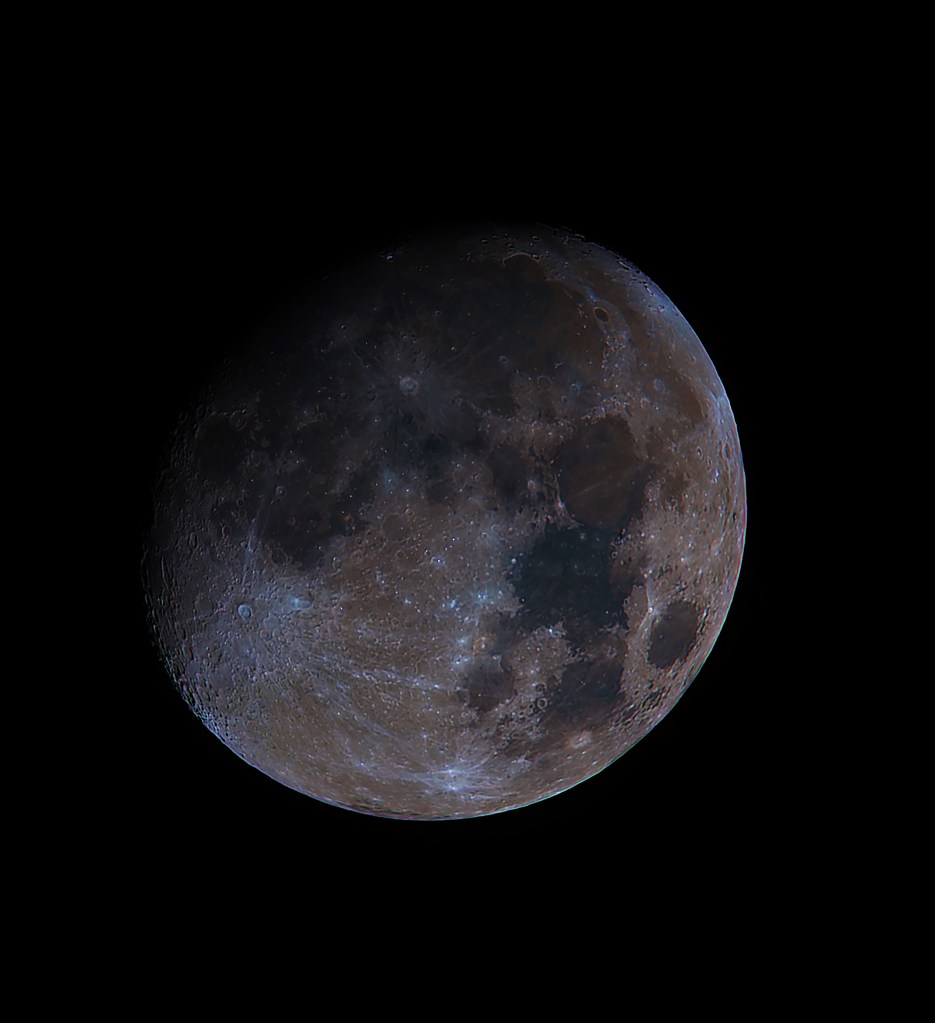
The true color of the moon are shades of gray. The lunar surface is primarily volcanic basalt but there are deposits of iron, titanium, calcium, aluminum with traces of uranium, titanium and potassium. Each of these minerals reflects a slightly different wavelength of light. Similar to how different gases in a Nebula reflect or burn and produce different wavelengths depending on the element.

Here’s a video that details how I processed this image.
In this image, the saturation of the image was increased to enhance the colors these different wavelengths produce. The orange and brown areas are richer in Iron, with the blue areas containing titanium. The brighter areas are newer impact craters which contrast against the old lava flows.
The below list is the chemical composition separated by the moons seas (first %) and the highlands (second %).
Silica 45.4%;
highlands 45.5%
Alumina 14.9%; 24.0%
Lime 11.8%; 15.9%
Ferrous oxide* 14.1%; 5.9%
Magnesia 9.2% 7.5%
Titanium dioxide 3.9%; 0.6%
Sodium oxide 0.6%; 0.6%
The pinkish hue around the edge of the image is called Chromatic Aberration. it is an artifact introduced by the optics of the telescope. it is a failure of the lens to focus all the colors at the same point. The effect of this is enhanced also when increasing saturation of the image.
Discover more from Nicks Astrophotography
Subscribe to get the latest posts sent to your email.
 Nicks Astrophotography
One thought on “Mineral Moon – Pixinsight and Photoshop”